
Why?
A friend of mine is promoting Linux in his company and for a certain number of applications he would like to use a public VPN service. Hotspot Shield is apparently one of the most widely known ones out there, so naturally people are asking whether it could run under Linux.
What makes you think it could run?
If you take a closer look at Hotspot Shield, one could quickly get the impression it’s easy to make it run under Linux and while you’re at it you might in fact believe for quite a while that you are on a successful track. However, it’s not that easy as it turns out and the author of this text eventually gave up on it. However, if you’re still determined you might actually get it to work and we’ll present an idea at the end of this text on what to do. Until then I just give you an idea stones that lay on the way to give you an idea what not to try.
Why not.
If you take a look into the binaries folder after installing Hotspot Shield, you get this or a similar look:
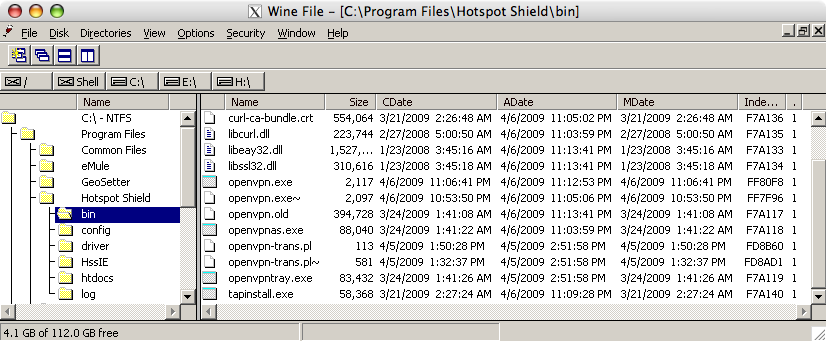
After the installation your first obstacle would be a Windows service trying to bind to port 895 – which is restricted to root under any decent Linux/Un*x system and this inaccessible, since you are not running wine as root (are you?). You can figure that out by enable tracing for winsock and executing the service executable openvpnas.exe (with the -debug parameter) directly. I bypassed this first obstacle by patching wine to assign a non-privileged port. People seem to look often for a solution to the root-ports problem, so one positive outcome of this experiment will be a wine patch. Once it’s pretty I will submit it to wine-patches mailinglist for inclusion. Should it get rejected, it will be posted here.
openvpn.exe appears to be the OpenVPN executable. If you understand the inner workings of wine a little bit more you will understand that OpenVPN is not likely to run out of the box, since within wine it will have a hard time creating a new network device on the kernel level. So, replacing openvpn.exe was my first candidate and I thought a good one: it’s GPL licensed and thus open.
You can start native applications on your machine through wine, thus replacing openvpn.exe with a native OpenVPN should have done the trick.
After quite some time of configuring and writing a wrapper around OpenVPN I had to find out that AnchorFree had done modifications to openvpn.exe. While I could address some of them with a wrapper (though one that had to rewrite network packets) in other aspects the modified openvpn.exe does not behave according to the manual of the GPL one and then it becomes really nasty to figure things out. While grumbling over the GPL violation I found out more or less by accident that OpenVPN is dual-licensed and this modification is in fact allowed.
How it could in fact work: ideas for someone else
With the openvpn.exe turning out not being a good cutting point for an interoperability patch, there is still an option left. The main problem of Hotspot Shield not running in wine is that it won’t be able to load a network driver into the kernel of the host OS. This particular driver, the ethernet network tap however came in fact from the Unix world and had been ported to Windows. So the remaining option would be to implement the Windows interface of the TAP-Win32 driver and map its calls to the native TAP driver. For me that is more time worth spending.
OpenVPN has to support both the traditional Un*x TAP driver and the Windows driver. Accesses to both of them can be found in tun.c (at least for the prelease 2.1 branch in the SVN repository). An implementation of a wine TAP driver therefore could largely be done with copy and paste. If you look for example for open_tun (which opens the TUN/TAP device), you will find implementations for:
- Linux
- Generic Un*xes
- Solaris
- OpenBSD
- NetBSD
- FreeBSD
- Dragonfly
- WIN32
- We look for the driver.
- We open the file associated with the driver.
- We configure the driver using device controls.
- has to be found as a driver in the Registry.
- should provide a device file that can be openedbe able to open the driver file (the device file).
- provide the Windows device controls and map them to the native OS.
Since OpenVPN’s tun.c is already doing the majority of the work, the actual implementation could be largely pasted from the above mentioned file.